Targeting rules
Build ordered rule groups with predictable matching and explicit outcomes.
Targeting rules serve different values to defined cohorts inside one environment. FeatureGate checks groups in order and returns the outcome of the first match.
Use targeting for staged releases, internal access, customer-approved cohorts, and durable runtime configuration. Do not use caller-supplied attributes as an authorization boundary.
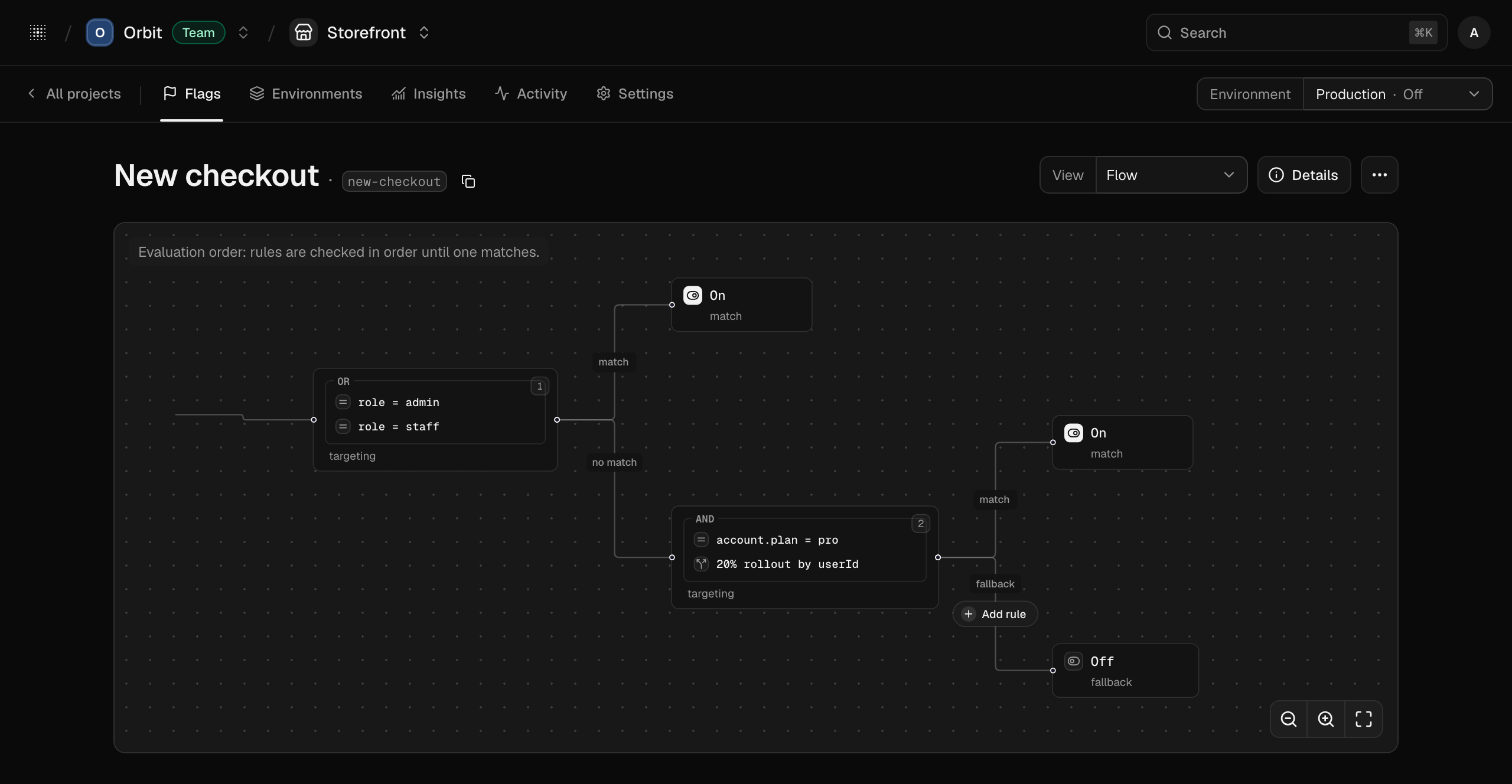
A match all group requires every condition to match. A match any group requires at least one. Each matching group has one typed outcome.
Attribute conditions use dot-separated paths such as account.plan. Supported operators are:
| Operator | Matches when |
|---|---|
| Equals | The attribute exactly equals the configured value |
| Not equals | A present attribute differs from the configured value |
| In | The attribute equals one value in a configured set |
| Not in | A present attribute equals none of the configured values |
Missing attributes are misses, including negative operators. An absent account.plan does not match
account.plan not equals free.
Open a flag, choose the environment, and keep the workbench in Flow, Visual, or Code view. These are three views of one ordered model, not separate configurations.
For a staff cohort:
user.role equals admin.user.role equals staff.Test an admin, a staff member, an ordinary user, and a context without user.role. The missing path
must fall through rather than match accidentally.
Put narrow exceptions before broad cohorts. A support override for one account normally precedes a plan-wide or percentage rule.
Suppose production contains:
account.id in [internal_account] → trueaccount.plan equals pro and 20% by account.id → truefalseThe internal account always receives true. Other Pro accounts participate in the stable rollout.
Everyone else receives false.
Moving the Pro rule above an explicit off exception could make the exception unreachable. Review the complete order whenever a broad rule changes.
Members, admins, and owners can change targeting. Viewers can inspect non-secret configuration only. Production changes appear in activity and may trigger configured notifications.
Record the reason, expected observation period, owner, and rollback condition. Do not include emails, raw targeting values, secrets, or incident payloads.
Context comes from the calling application. Continue enforcing permissions and entitlements in trusted application code even when a rule targets a role or plan.
Continue with Percentage rollouts and Design evaluation context.